

Settlements
Move collected stablecoin balances to your own bank or crypto wallet, automatically
Settlements move the stablecoin balances you collect from consumer payments out to your own destination — so funds don't sit idle in the collecting wallet. You configure settlement per wallet, choose where the money goes, and Volt sweeps the balance on the schedule you set.
How settlements work
You create a settlement configuration for a collecting wallet — its destination, amount, and schedule.
At each scheduled run (or when you trigger one manually), Volt checks the wallet balance.
Volt submits the payout to your chosen destination and tracks it through to completion.
The settlement is recorded with its status and the next run is scheduled automatically.
Configuring settlements in Fuzebox
You can configure settlements for each wallet, in the Wallets section in Fuzebox.

Add a beneficiary in the Beneficiaries tab.
Add a destination — a Bank account and/or a Crypto Wallet, depending on where you want to withdraw the funds.
Open the wallet details and, in the Settlement settings tab, configure the settlement for that wallet.
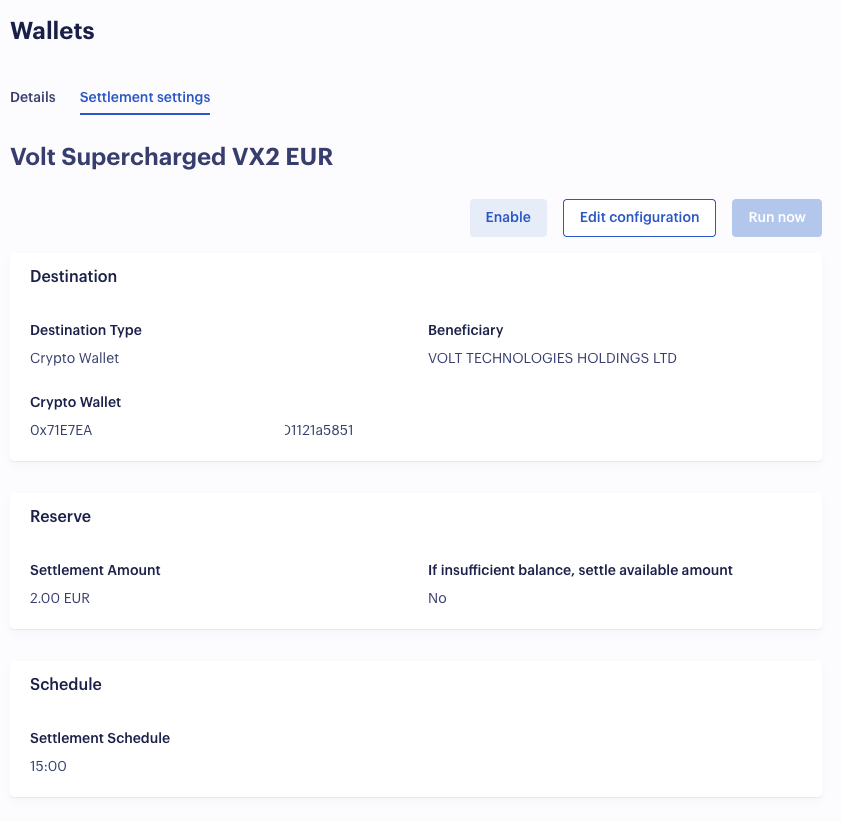
Destinations
Each wallet settles to one destination type:
- Bank account — a fiat payout (for example SWIFT or SEPA) to a bank account you have registered, paid to a beneficiary.
- Crypto wallet — a crypto payout to a wallet you own, identified by its address, network/protocol and currency.
You register your beneficiaries, bank accounts and crypto wallets once, then reference them from any settlement configuration.
Schedule
Settlements can run automatically, on demand, or both:
- Scheduled — run automatically every day at up to two times (in UTC). After each successful run, the next run is scheduled for you.
- Manual — trigger a settlement at any time, independently of the schedule, when you want to sweep funds immediately.
How much is settled
For each run you choose how the amount is determined:
- Settle all — sweep the entire available balance of the wallet.
- Fixed amount — settle a set amount each run, with an option to control what happens when the balance is insufficient.
Reliability
Settlements are designed to be safe to run unattended:
- Only one settlement can be in progress per wallet at a time, so runs never overlap.
- The next run is rescheduled automatically after a successful settlement.
- If a configuration fails repeatedly, it is paused automatically so problems surface instead of silently retrying.
Tracking settlements
Every settlement is recorded with its amount, currency, destination and status, and the full history is available per merchant — through the API or in Fuzebox. Settlements move through states such as PENDING, PROCESSING and COMPLETED; see for the complete list.
How is this guide?
Last updated on