

Refunds
Return funds from a completed stablecoin payment back to your customer
Refunds return funds from a completed stablecoin payment back to the payer. The payer receives an email with a link to complete the refund on their end. You can start a refund either through the API or directly in Fuzebox.
Only one active refund (PENDING or PROCESSING) can exist per payment at a time. Once a refund completes, the payment is marked as refunded and no further refunds are accepted.
Automatic refunds
While not intended, sometimes consumers choose to manually send the crypto payment instead of using the Volt Checkout flow. As exchange rates fluctuate, such payments sometimes end up sending the wrong amount. To handle this without the need for manual intervention, you can enable automatic refunds for payments that end up UNDERPAID or OVERPAID:
UNDERPAID— The payer sent less than stated on Volt Checkout. The full amount will automatically be refunded. Refund fees are borne by the payer.OVERPAID— The payer sends more than stated on Volt Checkout. Excess funds are automatically refunded, as long as the amount is greater than the refund fee. Refund fees are borne by the payer.
This returns incorrectly sent funds to the payer without any manual action or cost on your side.
Refund via API
List available wallets — check which wallets hold enough funds to cover the refund.
GET /stablecoins/refunds/available-wallets?paymentId={paymentId}[
{ "walletId": "a1b2c3d4-1234-5678-9abc-def012345678", "name": "EUR Main Wallet" },
{ "walletId": "e5f6a7b8-9012-3456-7890-abcdef123456", "name": "USDC Wallet" }
]Request the refund — initiate it with the chosen wallet.
POST /stablecoins/refunds{
"paymentId": "d4e5f6a7-1234-5678-9abc-111111111111",
"walletId": "a1b2c3d4-1234-5678-9abc-def012345678",
"reason": "Customer requested refund"
}| Field | Type | Required | Description |
|---|---|---|---|
paymentId | UUID | Yes | ID of the original completed payment |
walletId | UUID | Yes | Wallet to fund the refund from (from the available-wallets endpoint) |
reason | String | No | Reason for the refund |
An email with a refund link is sent to the payer to complete the refund.
Track the status — poll until the refund reaches a terminal state (COMPLETED or FAILED).
GET /stablecoins/refunds/{refundId}If a refund fails, the response includes a failureReason explaining why. See for the full list of statuses and failure reasons.
Refund via Fuzebox
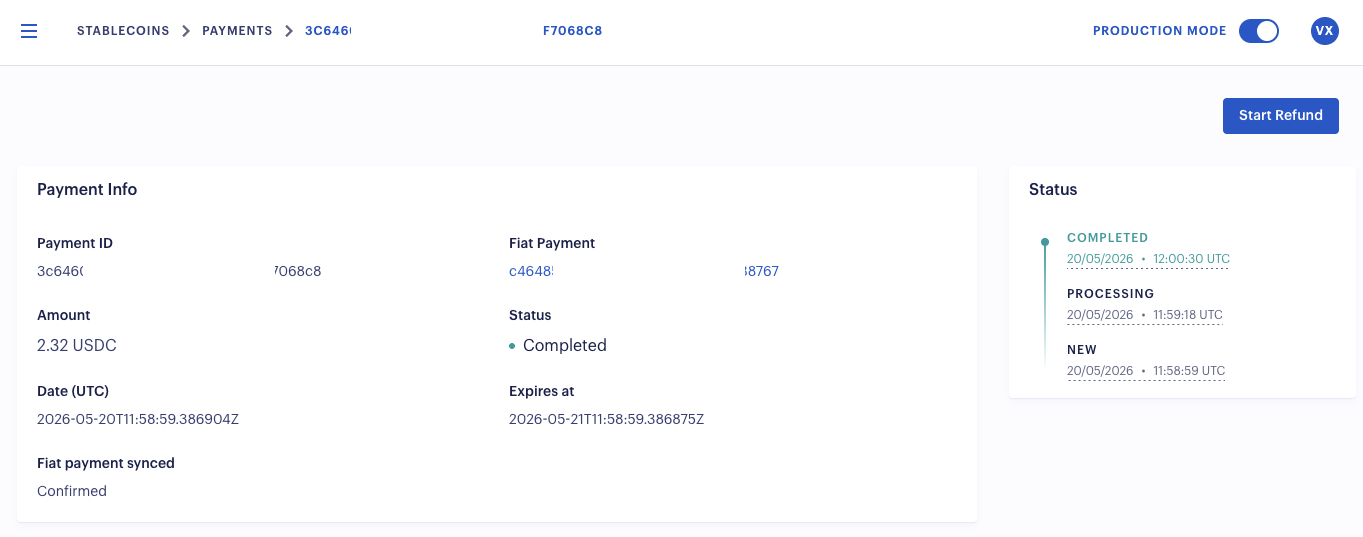
Navigate to Stablecoins > Payments and select the payment you want to refund.
On the payment details page, click Start Refund. This is only available when:
- The payment status is Completed
- The payment has not already been refunded
- No other refund is currently in progress for this payment
- Your role has permission to create refunds
In the refund dialog:
- The Payer Email is shown for reference — this is where the refund link is sent.
- Select a Refund Wallet. Only wallets with sufficient funds can be selected.
- Optionally provide a Reason.
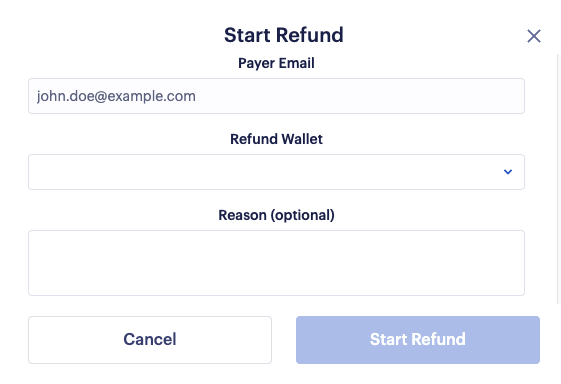
Click Start Refund to confirm. A refund link is sent to the payer's email address, and the refund status can be tracked on the payment details page.
How is this guide?
Last updated on