

Settlements
Move collected stablecoin balances to your own bank or crypto wallet, automatically
Collected stablecoin balances can be swept out to your own destination automatically, so funds don't sit idle in the collecting wallet. You configure settlement per wallet, choose where the money goes, and Volt sweeps the balance on the schedule you set.
Benefits
- Settle your way — send funds to a fiat bank account or to a crypto wallet you own.
- On your schedule — settlements run automatically every day, or on demand whenever you need them.
- Flexible amounts — sweep the full balance or settle a fixed amount each run.
- Full visibility — track every settlement and its status, with a complete history, in Fuzebox.
How it works
You create a settlement configuration for a collecting wallet — its destination, amount and schedule.
At each scheduled run, or whenever you trigger one manually, Volt checks the wallet balance.
Volt submits the payout to your chosen destination and tracks it through to completion.
The settlement is recorded with its status, and the next run is scheduled automatically.
Configuring settlements in Fuzebox
You can configure settlements for each wallet, in the Wallets section in Fuzebox.

Add a beneficiary in the Beneficiaries tab.
Add a destination — a Bank account and/or a Crypto Wallet, depending on where you want to withdraw the funds.
Open the wallet details and, in the Settlement settings tab, configure the settlement for that wallet.
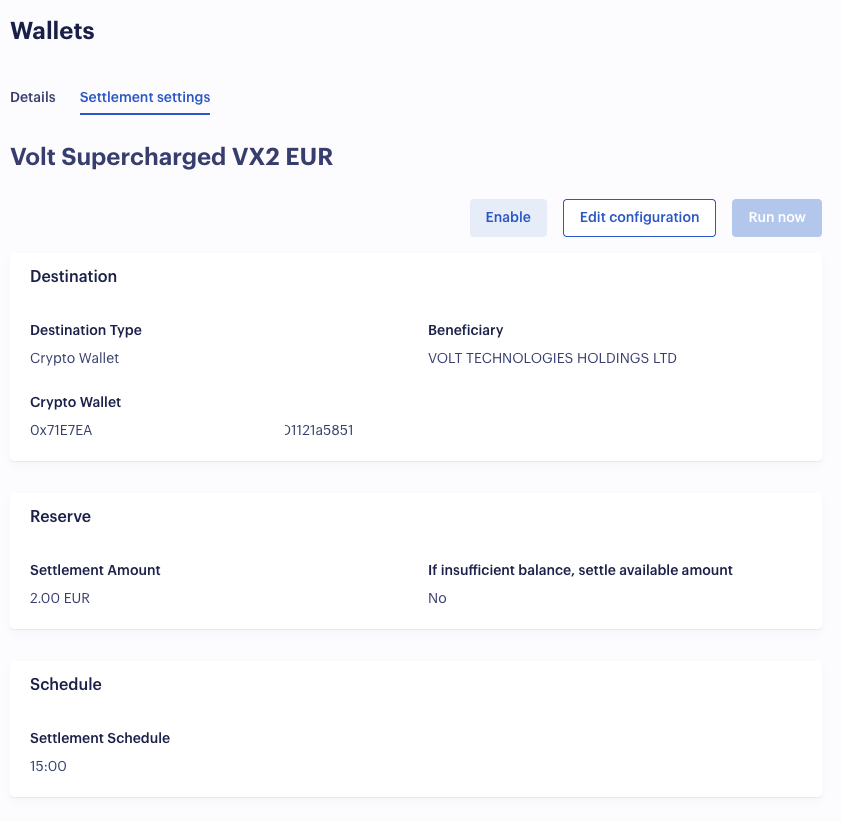
Destinations
Each wallet settles to one destination type:
- Bank account — a fiat payout (for example SWIFT or SEPA) to a bank account you have registered, paid to a beneficiary.
- Crypto wallet — a crypto payout to a wallet you own, identified by its address, network/protocol and currency.
You register your beneficiaries, bank accounts and crypto wallets once, then reference them from any settlement configuration.
Schedule
Settlements can run automatically, on demand, or both:
- Scheduled — run automatically every day at up to two times (in UTC). After each successful run, the next run is scheduled for you.
- Manual — trigger a settlement at any time, independently of the schedule, when you want to sweep funds immediately.
How much is settled
For each run you choose how the amount is determined:
- Settle all — sweep the entire available balance of the wallet.
- Fixed amount — settle a set amount each run. By default, a run is skipped if the balance is insufficient; you can instead configure it to pay out the remaining balance.
Reliability
Settlements are designed to be safe to run unattended:
- Only one settlement can be in progress per wallet at a time, so runs never overlap.
- The next run is rescheduled automatically after a successful settlement.
- If a configuration fails 5 times in a row, it is paused automatically so problems surface instead of silently retrying.
Settlement statuses
Every settlement is recorded with its amount, currency, destination and status, and the full history is available per merchant in Fuzebox.
| Status | Description |
|---|---|
PENDING | Settlement created and queued for processing. |
PROCESSING | Payout submitted to the provider, awaiting completion. |
COMPLETED | Funds successfully sent to the destination. |
FAILED | Settlement failed. |
CANCELLED | Settlement was cancelled. |
RETURNED | Funds were returned by the provider. |
ON_HOLD | Settlement is paused pending review. |
How is this guide?
Last updated on