

Payment
Make payment using Android Mobile SDK
SDK supports 2 flows of making payment:
- With bank pre-selection In this flow You call method to select user bank first and then call method to make payment using that bank. You can use this flow to allow user to select bank before gathering all data required to initiate payment.
- Without bank pre-selection In this flow You call method to make payment without providing
institutionId. Bank selection will always be displayed by SDK before making payment.
In both flows, after successful payment, bank InstituionData used for payment is returned to in ActivityResult. You can cache and use it as default for future payments. In case payment fails, user can either select different bank (without leaving SDK context) or cancel process and return to your app.
To initiate bank selection screen and payment screen, InstitutionInitiationData and PaymentInitiationData are required respectively.
Kotlin documentation
Kotlin documenation for SDK methods can be found here
Pre-select bank and initiate payment with institutionId
Select bank
Create ActivityResultLauncher
ActivityResultLauncher is used when launching bank selection screen. Activity result can be parsed using SDK helper method parseInstitutionResult(result: ActivityResult) to obtain selected bank InstitutionData data class.
class MainActivity : Activity() {

    private val institutionLauncher = registerForActivityResult(ActivityResultContracts.StartActivityForResult()) {
        if (activityResult != null) {
            val institutionData = Checkout.parseInstitutionResult(activityResult)
        }
    }
    // ...
}
Note: If user cancel bank selection, then ActivityResult is null.
Create InstitutionInitiationData and call Checkout.selectInstitution(...)
Calling `Checkout.selectInstitution(...) method opens SDK Activity that allows user to select bank.
import io.volt.sdk.Checkout
import io.volt.sdk.model.Currency
import io.volt.sdk.model.InstitutionInitiationData

class MainActivity : Activity() {
    // ...
    fun selectBank() {
        val institutionInitiationData = InstitutionInitiationData(
                currency = Currency.EUR,
                defaultCountryCode = "DE",
                isInstitutionFirstTimeSelection = true,
            )
        Checkout.selectInstitution(
            context = this,
            launcher = launcher,
            institutionInitiationData = institutionInitiationData
        )
    }
}
Where:
Prop
Type
If user have not previously selected bank isInstitutionFirstTimeSelection MUST be set to true.
To change previously selected bank use Checkout.selectInstitution(). In this case InstitutionInitiationData.isInstitutionFirstTimeSelection should be set to false.
import io.volt.sdk.Checkout
import io.volt.sdk.model.Currency
import io.volt.sdk.model.InstitutionInitiationData

class MainActivity : Activity() {
    // ...
    fun selectBank() {
        val institutionInitiationData = InstitutionInitiationData(
            currency = Currency.EUR,
            defaultCountryCode = "DE",
            isInstitutionFirstTimeSelection = false,
        )
        Checkout.selectInstitution(
            context = this,
            launcher = institutionLauncher,
            institutionInitiationData = institutionInitiationData
        )
    }
}
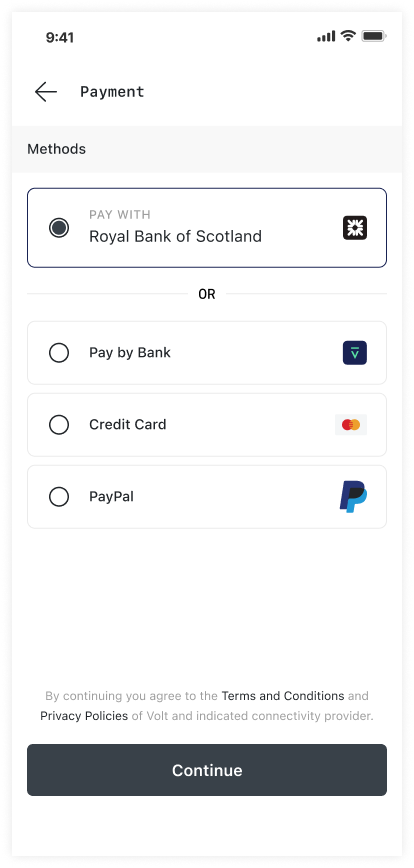
Display Volt's Terms and Condition
Add Volt Terms and conditions View to your UI. To obtain formatted string use one of two methods:
Checkout.getAgreementClauseAnnotated(urlColor: Color?): AnnotatedStringfor Compose based projectCheckout.getAgreementClauseSpannable(context: Context, urlColor: Int?): Spannablefor View based project
When user clicks on Terms and conditions view, Volt's terms and conditions page is opened in external browser.
import androidx.compose.material3.Text

Text(text = Checkout.getAgreementClauseAnnotated())<TextView
android:id="@+id/textView"
android:layout_width="wrap_content"
android:layout_height="wrap_content" />class MainActivity : AppCompatActivity() {
override fun onCreate(savedInstanceState: Bundle?) {
super.onCreate(savedInstanceState)
val textView: TextView = findViewById(R.id.textView)
textView.text = Checkout.getAgreementClauseSpannable(this)
textView.movementMethod = LinkMovementMethod.getInstance();
}
}
Pay with selected bank
Use InstitutionData returned from Select Bank step to initiate payment process.
Create ActivityResultLauncher
ActivityResultLauncher is used when launching payment screen. Activity result can be parsed using SDK helper method parsePaymentResult(result: ActivityResult) to obtain PaymentData
class MainActivity : Activity() {
    private val paymentLauncher = registerForActivityResult(ActivityResultContracts.StartActivityForResult()) {
       val paymentData = Checkout.parsePaymentResult(activityResult)
    }
    // ...
}
Create PaymentInitiationData
import io.volt.sdk.model.Currency

class MainActivity : Activity() {
    // ...
    fun pay() {
        val paymentInitiationData = PaymentInitiationData(
            currency = Currency.EUR,
            defaultCountryCode = "DE",
            institutionData = institutionData,
            amount = 100,
            paymentReference = "<paymentReference>",
            internalReference = "<internalReference>",
            userAgent = "AppName: MyPaymentApplication, AppVersion: X.Y.Z, DeviceModel: XYZ, OSVersion: X.Y.Z",
            payer = PayerData(
                reference = "<payerReference>",
                organisationName = "<organisationName>",
                firstName = "<firstName>",
                lastName = "<lastName>"",
                email = "<email>"",
                phoneNumber = "<phone>",
            ),
            transactionType = TransactionType.SERVICES
        )

        // ...
    }
}
Initiate payment process
Calling Checkout.pay(...) method opens SDK Activity that initiate payment.
import io.volt.sdk.Checkout

class MainActivity : Activity() {
    // ...
    fun pay() {
        // ...
         Checkout.pay(
            context = this,
            launcher = paymentLauncher,
            paymentInitiationData = paymentInitiationData
        )
    }
}
After payment is complete and SDK Activity is dissmissed, use Checkout.parsePaymentResult(result: ActivityResult): PaymentData? to parse result and obtain PaymentData object containing payment status.
For best user experience, you should cache PaymentData.InstitutionData and use it for future payments.
Initiate payment without bank pre-selection
Implementing this flow is similar to implementing Pay with selected bank. The difference is in passing null as value of PaymentInitiationData.institutionData
Create ActivityResultLauncher
ActivityResultLauncher is used when launching payment screen. Activity result can be parsed using SDK helper method parsePaymentResult(result: ActivityResult) to obtain PaymentData
class MainActivity : Activity() {
    private val paymentLauncher = registerForActivityResult(ActivityResultContracts.StartActivityForResult()) {
       val paymentData = Checkout.parsePaymentResult(activityResult)
    }
    // ...
}Create PaymentInitiationData
import io.volt.sdk.model.Currency

class MainActivity : Activity() {
    // ...
    fun pay() {
        val paymentInitiationData = PaymentInitiationData(
            currency = Currency.EUR,
            defaultCountryCode = "DE",
            institutionData = null,
            amount = 100,
            paymentReference = "<paymentReference>",
            internalReference = "<internalReference>",
            userAgent = "AppName: MyPaymentApplication, AppVersion: X.Y.Z, DeviceModel: XYZ, OSVersion: X.Y.Z",
            payer = PayerData(
                reference = "<payerReference>",
                organisationName = "<organisationName>",
                firstName = "<firstName>",
                lastName = "<lastName>"",
                email = "<email>"",
                phoneNumber = "<phone>",
            ),
            transactionType = TransactionType.SERVICES
        )

        // ...
    }
}Initiate payment process
Calling Checkout.pay(...) method opens SDK Activity that initiate payment.
import io.volt.sdk.Checkout

class MainActivity : Activity() {
    // ...
    fun pay() {
        // ...
         Checkout.pay(
            context = this,
            launcher = paymentLauncher,
            paymentInitiationData = paymentInitiationData
        )
    }
}After payment is complete and SDK Activity is dissmissed, use Checkout.parsePaymentResult(result: ActivityResult): PaymentData? to parse result and obtain PaymentData object containing payment status.
How is this guide?
Last updated on
Integration
Follow the instructions below to integrate the Volt Mobile SDK for Android in your project.
Overview
VoltCheckout handles the entire open banking payment flow inside your iOS app. Give it a payment intent, let the user pick their bank and authorise the payment, and get back a result with the payment ID and status.